 George Miller
Should You Move away from Subscription-Based PDF Tools for SwifDoo PDF?
SwifDoo PDF is a full-featured PDF editor that lets users do a lot more than just creating and editing PDF documents. It comes with the Windows “look and feel,” which gives users a sense of familiarity and makes it extremely easy for them to navigate.
Beyond PDF creation and editing, SwifDoo also provides a number of tools that you can use for annotate, highlight, shape, split, merge, and even protect your PDFs. You can also convert PDFs to Word, Excel, image, or PowerPoint and the other way around.
It has got advanced security features such as PDF password protection, digital signatures, and redaction. You can use it both for personal and professional use. You can work online, take it offline, or save your changes on the cloud.
Above everything else, SwifDoo is a low-cost PDF tool. SwifDoo does not scream for attention like some of the bigger names in the PDF software market; instead, it makes a case for itself through a clean interface, practical functionality, and an emphasis on getting everyday document work done without unnecessary complexity.
All things combined, is SwifDoo really the alternative that you should pay for? Should you say goodbye to all those subscription-based PDF tools that come with bigger promises and heftier price tags? Let’s explore.
Pros&cons
- Extensive features
- Simple interface which is easy to navigate
- Great customer support
- Maximum 2 users supported on a single license (max 10 users in enterprise plans)

How Was My Experience with SwifDoo?
I gave SwifDoo PDF a try to find out how it would fare with the PDF tasks that come across my desk every day. The program is sold as a do-it-all PDF package. I got the perpetual license and tested it out.
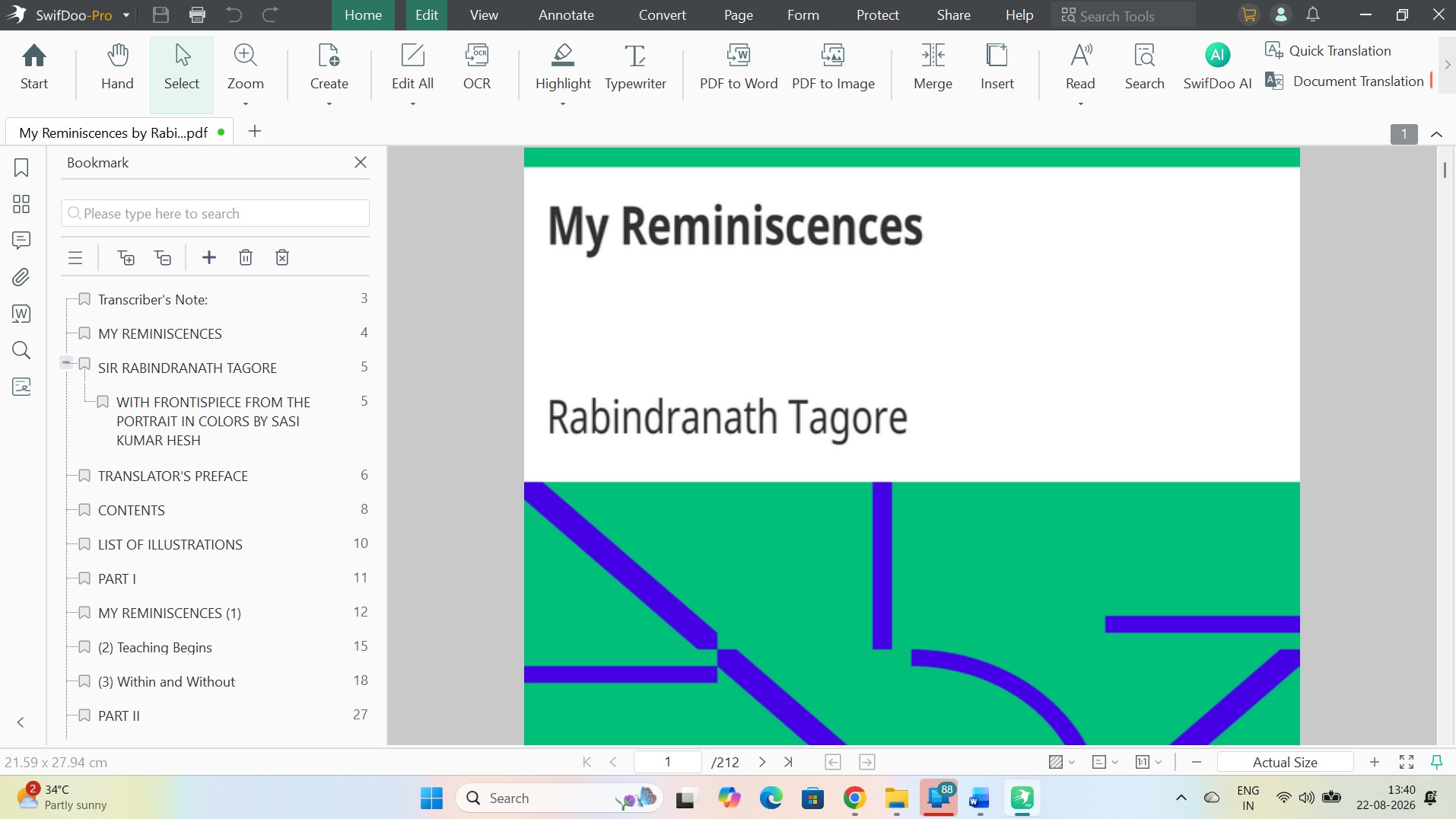
For a paid editor, SwifDoo handles a pretty wide range of routine PDF work. I could change existing text, adjust fonts and formatting, move content around, split files, merge documents, and reorganize pages without much trouble.
The interface deserves some credit here. Much of it looks and behaves like familiar Windows software, which meant I could get down to work almost immediately.
The main controls sit in sensible places, so finding a basic tool rarely turned into a search through menu after menu.
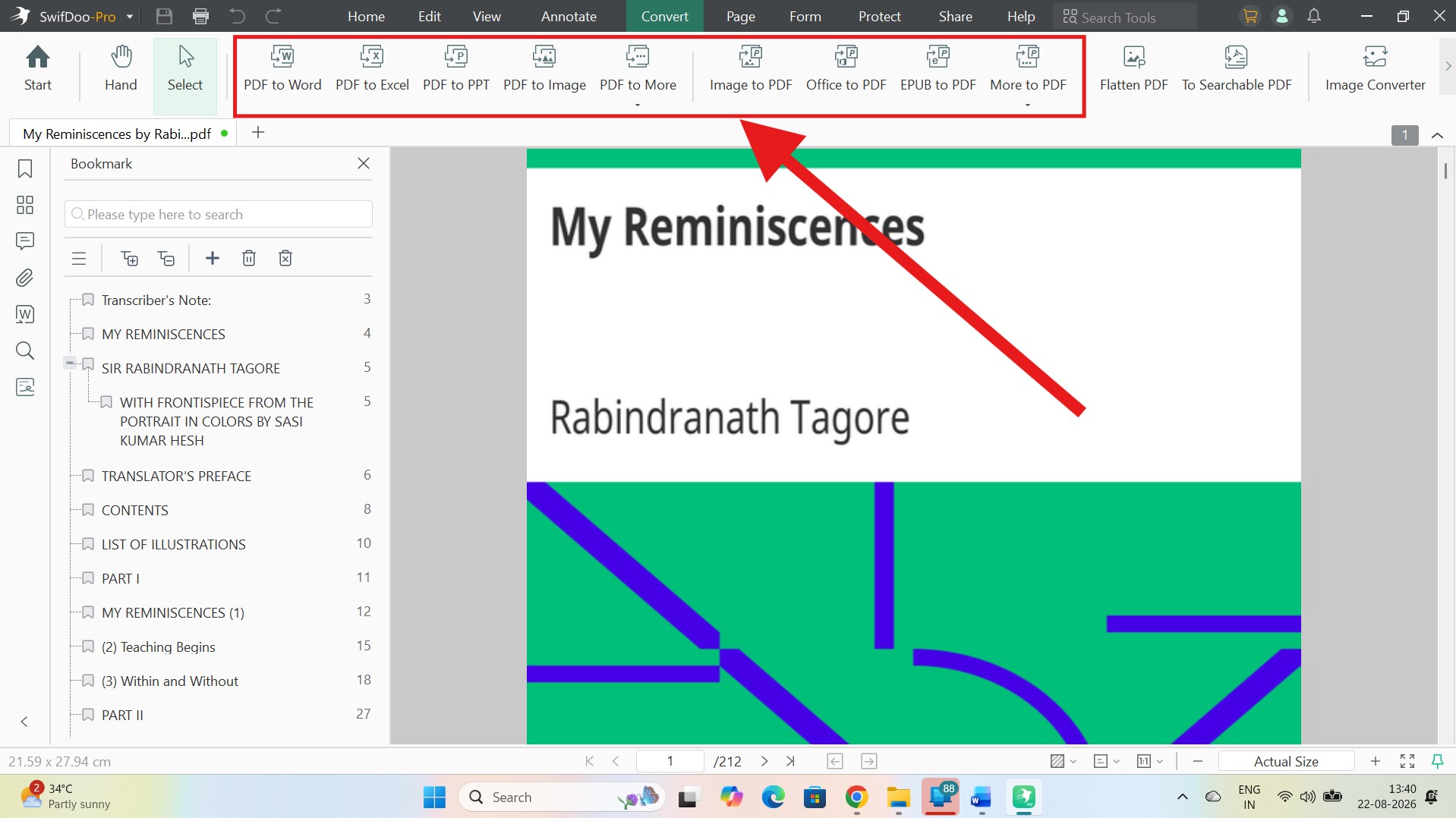
Conversion got plenty of use during my time with the software, and I found myself returning to it fairly often. PDFs can be changed into Word files, images, and a number of other familiar formats; supported files can also be turned into PDFs.
That comes in useful when somebody sends over a PDF but you really need the contents in an editable or reusable format. Instead of opening another program or heading to an online converter, I could handle the file without leaving SwifDoo.
It opened quickly, responded well while I moved around documents, and never made a simple job feel heavier than it should.
For quick fixes such as changing a sentence or extracting two pages from a long document, the program’s speed is something you notice.
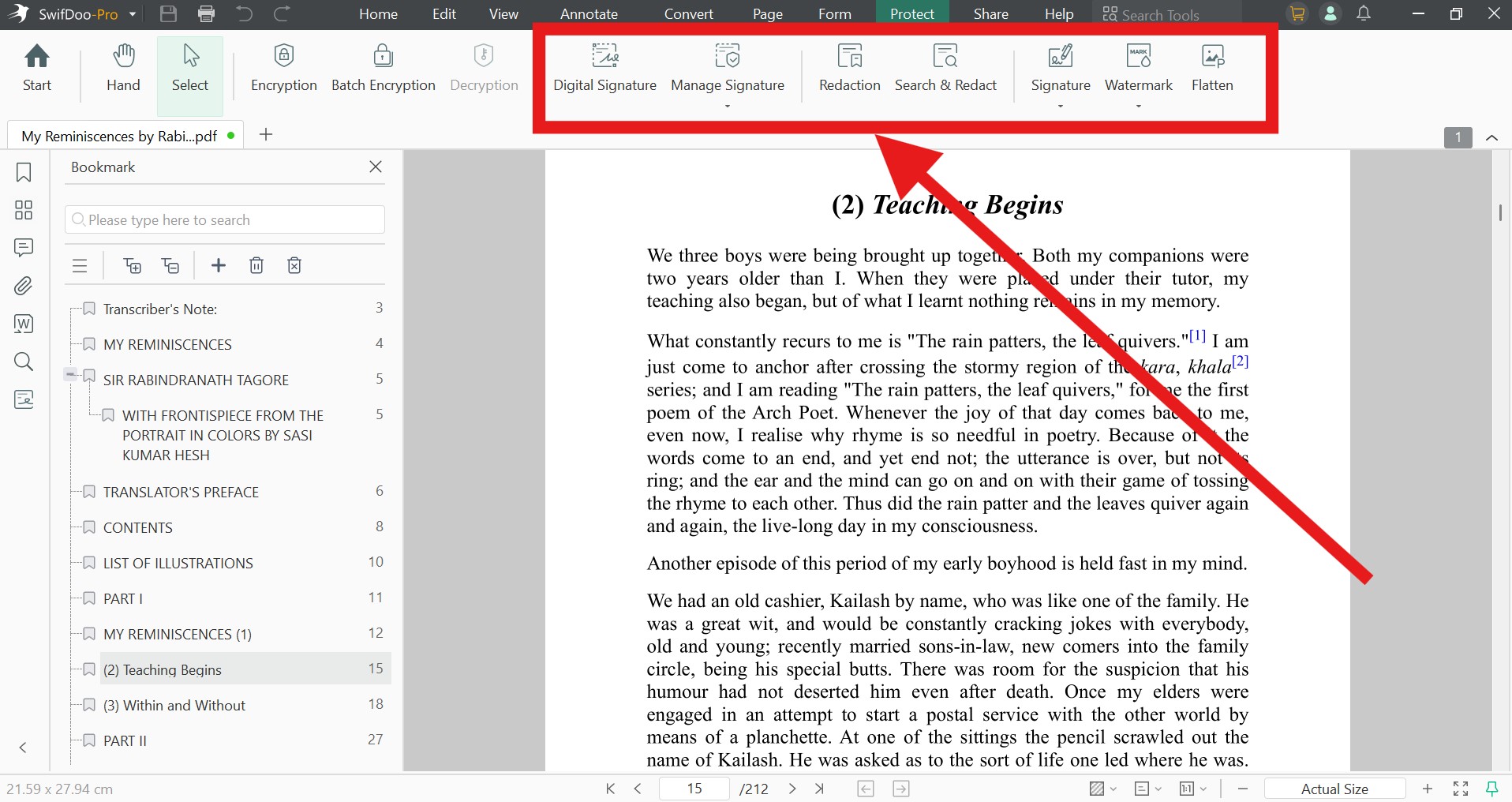
I came away liking SwifDoo more than I expected to. It has a much lower profile than the household names in PDF software, yet the program holds its own surprisingly well in day-to-day use.
There’s also very little of a learning curve before you can start getting useful work done. A first-time user should be able to get around without much help, while someone who works with PDFs every day will find enough tools to do considerably more than basic editing.
Add the relatively reasonable price, and SwifDoo starts to make sense for people who need a proper PDF editor but don’t necessarily need, or want to pay for, a heavyweight package such as Adobe Acrobat. However, I wanted to pit it against not just Adobe, but to a range of other PDF tools. Here’s what I found.
SwifDoo vs Competitors – Key Similarities and Differences
| Feature | SwifDoo PDF | Adobe Acrobat | Foxit PDF Editor | PDF-XChange Editor | PDFgear |
| Edit PDF text |  |
|
|
|
|
| Edit images | |
|
|
|
|
| Annotate | |
|
|
|
|
| Merge/split PDFs | |
|
|
|
|
| OCR | |
|
|
(OCR in Editor Plus) |
|
| PDF conversion | |
|
|
|
|
| PDF forms | Fill/forms support | create & fill |
create & fill |
form creation mainly Editor Plus |
edit/fill form fields |
| E-signatures | |
|
advanced Foxit eSign depends on plan |
FreeSign |
|
| Redaction | |
desktop |
|
|
|
| Password/encryption | |
|
|
|
|
| AI PDF tools | |
|
|
v11, requires your AI-provider API key |
|
| Chat with PDF | |
|
|
through AI Assistant |
|
| Windows | |
|
|
|
|
| macOS | |
|
|
 |
|
| iOS | |
|
|
|
|
| Android | |
|
|
|
|
| Online tools | |
|
|
full web-editor counterpart |
|
| Free version | Limited after trial | Acrobat Reader + limited online tools | Foxit PDF Reader/free functions | many features free |
core editor is free |
| Subscription | (also a perpetual license available) |
|
|
No conventional subscription required | |
Where SwifDoo PDF Really Pulls Ahead?
Beyond the numbers, I tried to find out where SwifDoo really has the competitive edge, as some nuanced use cases are hard to capture in a simple Yes/No chart.
First of all, it’s a small and humble software program that eats up only 150 MB of your disk space. But you get PDF and image editing, conversion, password protection and a plethora of PDF management features. In my opinion, this relatively small footprint is a real selling point for users that need a capable PDF editor on a lot of everyday PCs without installing something much larger.
There is also an offline angle that deserves more attention. Many users find it hard to get a true PDF editor that can live on the computer rather than forcing documents through a browser. SwifDoo fits that use case better than its growing collection of cloud and AI features might suggest.
The company says files handled with its Windows and Mac desktop tools remain stored locally on the device. That gives users a practical choice. The routine editing can stay on the desktop, while online services are there when they are actually needed.
Another point in SwifDoo’s favor is how much territory it covers without demanding modern hardware. It is compatible with Windows 7 and above. This means a lot for average users, as they don’t have to replace their older PCs just to run a document software.
Cross-device support has improved the proposition as well. SwifDoo now versions for Mac and Android users too. Windows remains the fuller package, while SwifDoo itself says the Mac version lacks some of the advanced features such as AI document handling, translation, and cloud storage.
There is an unusual upside on Mac, though: SwifDoo currently says its macOS version is completely free, with all Mac features accessible even without signing in.
Put those pieces together and SwifDoo’s position in the table starts to make more sense. Adobe Acrobat and Foxit still go further in several professional areas, while PDF-XChange remains an exceptionally deep Windows tool and PDFgear puts plenty on the table for free.
SwifDoo’s case rests on a different combination, I believe. It has a small desktop footprint, support for older Windows hardware, genuine local document editing, broad format support, and enough advanced tools to keep most day-to-day PDF work inside one application. It doesn’t win every row of the comparison. For a lot of regular office work, it may not need to.
Is SwifDoo PDF Really a Cheaper Option?
For most people shopping for a paid PDF editor, the better question isn’t simply which program costs less. It’s what you actually get for the money and how often you’ll have to pay for it.
SwifDoo does well on that count. Its annual plan costs $69 per year for two devices, while the two-year plan costs $99. There’s also a one-PC perpetual license available at $96.75. That perpetual license includes lifetime upgrades and technical support.
For someone who regularly edits text and images, converts PDFs, runs OCR, signs documents, adds annotations, or reorganizes pages, the perpetual option is probably the most appealing part of SwifDoo’s pricing. You pay once and keep the software instead of adding another annual subscription to the pile. If you plan to use a PDF editor for several years, that difference adds up.
There are cheaper ways to handle PDFs. PDF-XChange Editor, which offers almost the same set of features, starts at $62 for a single-user perpetual license, which makes it a decent option for Windows users who are comfortable with its busier, more technical interface. PDFgear costs even less. Its core PDF editor is free. If it already covers everything you need, paying for another editor would be difficult to justify.
However, SwifDoo starts to make more sense when usability enters the equation. PDF-XChange gives experienced Windows users an enormous amount of control for the price, while PDFgear is hard to argue with for basic and moderate PDF work.
I found that SwifDoo sits somewhere between them and the more expensive professional suites. It gives you a broad collection of editing, OCR, conversion, security, signing, and page-management tools without asking you to learn an especially dense interface.
AI needs to be considered separately. SwifDoo AI currently costs $7.90 per month, with an annual option also available, and SwifDoo sells combined PDF Pro and AI packages. If you only need the regular PDF editor, that additional cost doesn’t matter. If you expect to use document chat, summaries, translation, and other AI functions regularly, include it when comparing SwifDoo with products that bundle AI differently.
I wouldn’t call SwifDoo the cheapest option and leave it at that. There are cheaper PDF tools out there, but SwifDoo definitely offers a great value for money with its simple interface, a host of everyday functionalities, cross-platform availability, and a perpetual license with lifetime upgrades.
Should You Switch to SwifDoo PDF?
SwifDoo’s strongest case is pretty simple: it does most of what you regularly need from a PDF editor without making the work feel complicated. Editing is easy to figure out, OCR and conversion are useful, and the Windows app runs well on older devices as well. You might also like having the option to buy a perpetual license instead of paying every year.
I wouldn’t recommend switching on price alone, though. I’d stick with Acrobat or Foxit for heavier professional work, while PDF-XChange offers more control for experienced Windows users. For my everyday PDF work, however, SwifDoo hits a comfortable middle ground. Should you stick to the subscription plans or keep it forever? It’s your choice ultimately.