 George Miller
CyberLink PowerDirector 2026 Ultimate Review – Is It The Best Or Just A Good Video Editing Software?
- Easy to Use and simple interface
- Impressive rendering and previewing speed
- Abundant special effects
- Seamless Multi-cam support
- Unique motion tracking
- Powerful Action cam tools
- Lack of Mac version


What’s New in CyberLink PowerDirector 2026 Ultimate
- Improved Mask Designer Linear and Parallel
- Improved Mask Designer Vertex Selection
- Sketch Animation Overlays
- Bloggers Social Media Pack
- Advanced Screen Recorder
- Sound Seamless Integration
- Keyframe Control on PiP & Title – Anchor point
- Keyframe Control on PiP & Title – Hold Mode
- Customizable Motion Graphic Titles
- Customizable Color Matching
CyberLink PowerDirector 2026 Ultimate Overview
Making a wonderful movie is a painstaking effort, and editing video is the most complicated task in the process. Without proper editing, your raw footage may look rubbish, no matter how skillful you are or how expensive your camera is. Therefore, if you are a serious moviemaker, you cannot do it without a professional video editor. Here, the CyberLink Power Director can be your best companion, as it can take your creations to new heights of perfection. It is one of the most popular video editing platforms and can help both beginners and professionals alike to display their skills and creativity to the world.
What Features Make CyberLink PowerDirector The Best Video Editing Tool
1. CyberLink PowerDirector 2026 Ultimate is what I would call an outstanding option if you are after a video editing application that is packed with features, AI, powered, and still able to produce high, quality results in a way that is friendly to the user Just to put it briefly, the following shows the AI, powered features in CyberLink PowerDirector 2026 that are aimed at making work easier and the results better
– AI Voice Translation and auto, editing, besides translating the dialogue into other languages, the feature also gives lip synchronization that sounds realistic. In addition, this option enables you to take raw video clips/photos and make the edited versions (sharing, ready).
– AI Object Masking and Motion Tracking, identifies objects (human beings, animals, etc.) in the picture and also follows their movement with absolute accuracy. Great for adding moving titles and graphic/video effects.
– AI Sky Replacement and Background Removal, just imagine how easily you can change your sky or remove your background without having to use green screens.
– AI Audio Enhancement, gets rid of the difficulties in handling the audio files by providing the complete solutions that users need with just one click, such as the cleanup, noise reduction, speech quality enhancement, and even text, to, speech conversion.
– AI Frame Interpolation, pulls you additional frames to show the video in a more fluid manner and also to create slow, motion effects.
2. PowerDirector Ultimate combines powerful manual tools with creative control:
– Precision Timeline & Keyframe Controls for fine, tuning effects and animation.
– Rich Effects Library & Transitions with motion graphics, animated titles, LUTs, and blending modes.
– Advanced Color Grading tools with curves, LUT support, and cinematic presets.
– Green Screen & Mask Designer for professional composites and creative visuals.
These features give creators both speed and control for cinematic projects.
3. MultiCam Editing. VR Workflows have been enhanced to include functionalities such as syncing and switching between different camera angles, in addition to editing and stabilizing 360′ Video content. A number of professional codecs such as HEVC, ProRes, and HDR10 are available to users for high, quality output formats; with the support for video exporting in 4K resolution, these formats make it possible for the content to be utilized in anything from simple YouTube videos to VR projects, as well as being used in a professional setting.
4. Audio Ducking is one of the features that have been used in balancing soundtracks and making use of Advanced Mixers. Voice Over +Recorded content for tutorials and presentations, as well as the inclusion of hardware accelerators that both enhance the rendering speed and contribute to a smoother performance during the editing process, are some of the features. These features are instrumental in ensuring that your video projects sound appealing as well as looking good, and that you will be able to successfully complete your projects in less time.
5. PowerDirector has taken steps to create an interface that is both easy to navigate for someone just starting out, but also allows for advanced tools for advanced users. To this end, PowerDirector’s interface includes features such as: Drag-and-drop timeline, customizable work spaces, and previews in real time. PowerDirector provides an excellent mix of features for both the beginner who wants a simpler approach and the advanced user who needs a more professional result.
CyberLink PowerDirector 26 Ultimate Installation Guide
Multiple Editing Modes
You can select the editing mode right from the startup and if you are an expert editor, select the full featured editor that features 100-track timeline-editing interface with precision keyframe control. On other hand, if you are a novice video editor, you can choose Easy Mode, in which the MagicStyle tool will help you to produce professional quality videos in minutes. All you have to do is to choose the right template, select the photos and videos you want to use and PowerDirector will complete the task for you.
Multi-Cam Editing
For many events, shooting with more than one camera is necessary for the effective coverage, and editing multi-cam videos is really a nightmare. The MultiCam Designer in CyberLink PowerDirector allows you to simulate switching from up to four different cameras, and you can select the best sequence or angle from the simultaneously shot videos. Use hotkeys to easily switch between shots and synchronize tracks by audio or time-code.
New Theme Designer
This feature allows you to convert your videos and images into a polished and stylish 3D animated slideshow video. You can choose from an enormous collection of built-in animated design templates, drag, and drop the content to create amazing videos.
360° Video Editing
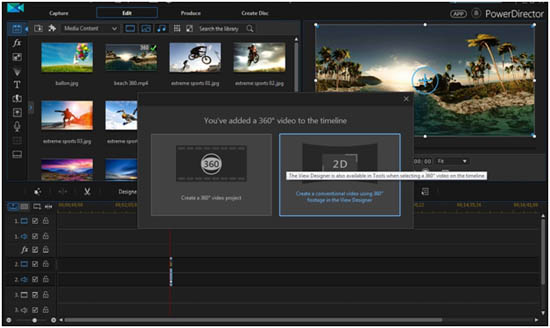
This feature was first introduced in PowerDirector 15 Ultra. It comes with a complete set of tools that enable you to create, edit and share immersive 360° projects from equirectangular footages. It features full 360° Video Editing tool kit to trim, combine and add titles, animated particle effects and transitions to the clippings and export them in 360° Video format. The new True360 View Designer allow you to walk through the 360° videos and extract any particular sequence so that you can include it in a standard video project. Moreover, with this tool, you can play 360° Video format in standard video projectors and the scene will look like it have been filmed using multiple cameras put at different angels. Another attraction in the PowerDirector is the Action Camera module that can be used to correct the fish eye effect that is most common with the wide angle cameras used to shoot 360° footage.
Express Projects
Express Project is a simple way to make high quality movies instantly. The module includes many preprogrammed templates, which can be filled with your video clips to make a beautiful movie in no time. Open the Express Projects menu and import your clips, rearrange them in the order they are intended to play using drag and drop, and hit Produce to make your movie. You can also share them instantly on any social media platforms.
Ease of Use
It is one of the most intuitive video editors available today. Despite the huge number for tools in the PowerDirector, its interface is remarkably clear and user-friendly, and you do not need to be a Hollywood professional to make the best out of it. It let the beginners to learn the basics of video editing while the advanced users can do their job quickly and more easily. PowerDirector provides three options to create your movie. If you are a seasoned pro, you can choose the full feature editor that comes with the popular timeline and storyboard layout. If you are not experienced to jump into that option right away, you can go for the simplified editor and it will automatically create your video in just a couple of minutes. In addition, the Magic Movie Wizard in Easy Editor will help you to make a finished video in a few steps. Just load the raw clips, select background music and pick the style, the PowerDirector with its Magic Style algorithm, analyze the clips and automatically arrange them to form a well-edited movie.
High Speed Video Editing
CyberLink PowerDirector is ranked as the world’s fastest video editing software. The TrueVelocity 7 editing engine in this software provide blazing rendering previewing speeds for the most high divination videos including H.264. It is optimized for Intel AVX2 technology and provides 5 times faster rendering speeds compared to its rivals.
CyberLink PowerDirector Alternatives
Strong sides of PowerDirector:
Artificial Intelligence (AI) Editing Tools: With AI-driven editing options like detection of scenes in videos, automated editing capabilities with few clicks of the mouse and video background removal through video clips, cleaning up audio from videos and adding subtitles automatically, PowerDirector allows users to achieve their creative vision with speed and ease.
Massive Asset Archive: A massive library of transitions, effects (including LUTs), titles and stock elements are included with PowerDirector as part of the package. Thousands more built-in resources are included than pretty much anywhere else in the Pinnacle Studio application alone.
Format Compatibility Across Multiple Formats: PowerDirector supports the latest video and image encoding standards such as Ultra High Definition (4K), High Dynamic Range Format (HDR), High Efficiency Video Coding (HEVC), etc., along with accelerated hardware rendering to allow users to create videos faster than possible on the same type of systems using Pinnacle Studio.
Cross-Platform Availability: PowerDirector is available on Windows and macOS. In addition to these operating systems, it has mobile versions for both Android and iOS devices. Compared to this, Pinnacle Studio is a Windows-only product.
Timely Updates and New Cloud Content Packages: The subscription-based version of PowerDirector comes with new features added on a monthly basis, access to cloud storage and the availability of new packages of content for down the road.
Strengths of Pinnacle Studio:
Pro-level Editor Experience: Pinnacle Studio has a more powerful set of pro-level tools, including unlimited video/audio tracks, advanced keyframe manipulation, editing 360° videos, smart object tracking, and masking video clips to give videographers complete control over their projects.
Price for Each Licencing: Purchasing Pinnacle Studio outright (usually at a price that conveys more functionality than most programs that come with many features included) usually provides a much better price during the actual purchase process.
Ease of Use for Novice Users: The use of Pinnacle Studio appears to have an advantage over PowerDirector in that most novice users find that the Pinnacle Studio user interface is easier for them to use to edit video.
Here are several features which make Corel VideoStudio 23 Ultimate the better choice in comparison to CyberLink PowerDirector 2026 Ultimate
- Better User Interface
For beginners and occasional video editors, Corel Video Studio’s interface is easier to navigate than other programs. In fact, many people who have used Corel Video Studio find it easier to get started with a simple interface that doesn’t overwhelm them with too many options. Many users tell us that they think CyberLink Power Director’s user interface is overwhelming, confused and dense.
- Color Grading and LUTs
Corel Video Studio offers many new tools to allow users to create visual effects through color grading and LUTs. Video Studio offers various color wheels and curves to manipulate colors via separate, individualistic adjustments. Corel Video Studio offers a total of 34 separate LUTs to add dynamic color palettes to video projects. While CyberLink Power Director has the ability to adjust color and add LUTs, users must use a plugin in the CyberLink ecosystem or demand another program in the CyberLink environment.
- Creative Title Transitions
Every kind of a creative title or transition effect should fit into various creative storytelling styles. Corel Video Studio has Kinetic Titles and Parallax Titles. Kinetic titles give a sense of 3D movement to an animated title; A parallax title creates a visual title moving away from an object in the scene. In addition, Corel Video Studio offers numerous animated title and transition packs as well as Kinetic Titles that add energy and visual creativity to incorporate title visual styles.
Users of Power Director report that they often use Power Director’s template-based transition designs. However, Corel Video Studio’s title and transition designs appear to be more handmade than those from Power Director.
- Beat Matching Audio Cue Tools
For instance, audio cues allow users to create a music video or social media content with clips synced up to the beat of a song quickly. While PowerDirector has an audio editing feature, the use of audio cues to sync up clips is often regarded as a major advantage over PowerDirector in many Corel VideoStudio marketing materials.
- Smart Proxy Manager
The smart proxy manager in VideoStudio allows video editors with slower computers to work more efficiently with proxy files (lower resolution versions of the original video).
- Support for Use of AV1 Codecs
Support for AV1 codecs in VideoStudio allows import and export of video files using the latest video compression technology. Support for AV1 codecs in PowerDirector is likely not included in the base product.
- No Recurring Fees/One-Time License
The license for VideoStudio is a one-time purchase rather than a subscription-based upgrade system, meaning you have permanent access to your purchase. This can be particularly appealing if you wish to avoid recurring fees such as those associated with PowerDirector.